
Newsroom OS turns WordPress into an editorial command center for publishers, newsrooms, and content teams. This documentation is written for site owners, chief editors, SEO teams, and authors.
# Newsroom OS Documentation (v1.5.0)
Newsroom OS turns WordPress into an editorial command center for publishers, newsrooms, and content teams.
This documentation is written for site owners, chief editors, SEO teams, and authors.
—
## 1) What Newsroom OS Is
Newsroom OS combines:
– Editorial task management inside WordPress
– Real-time writing guidance in Classic + Gutenberg editors
– Internal linking and timeline storytelling tools
– Advanced Schema.org graph generation for SEO and AI discovery
– E-E-A-T author/entity enrichment
It is designed for both high-traffic news websites and content-heavy blogs.
—
## 2) Version 1.5.0 Highlights
– Live Coverage Schema mode (`LiveBlogPosting`) with per-post toggle
– Strict/Hybrid schema output policy for Yoast/Rank Math compatibility
– Schema QA panel in settings (quality hints + JSON-LD preview template)
– Featured image guardrails for Discover/article eligibility (>=1200px preferred)
– Sidebar notices when featured image is missing or too small
– Multilingual entity detection improvements (EN/EL + DE/FR/NL/ES signals)
– Better i18n consistency (English/Greek)
– Stabilized live scoring/evaluator flow in Classic and Gutenberg
– Performance hardening for large sites (query limits + cache-first behavior)
—
## 3) Requirements
– WordPress 5.8+
– PHP 7.4+
– Recommended: latest WordPress and PHP 8.x for best performance
—
## 4) Installation
1. Upload and activate the plugin from WordPress admin.
2. Open the onboarding wizard.
3. Configure:
– Site profile (Newsroom or Blog)
– Language and geo target
– Schema mode
– Timeline strategy
4. Save settings.
After activation, editors will see the Newsroom OS sidebar in post edit screens.
—
## 5) Quick Start (5 Minutes)
1. Go to **Editorial Control -> Settings & Prompts**.
2. Set:
– `Schema Engine`: `NewsArticle` (for publishers) or `Article` (for blogs)
– `Schema Output Mode`: `Strict` or `Hybrid`
– `Enable LiveBlog schema feature`: on/off
3. In a post:
– Add a featured image (prefer width >=1200px)
– Use the sidebar to improve score and insert links/timeline
– (Optional) enable `Live Coverage Schema` for live coverage posts
4. Publish/update and validate JSON-LD.
—
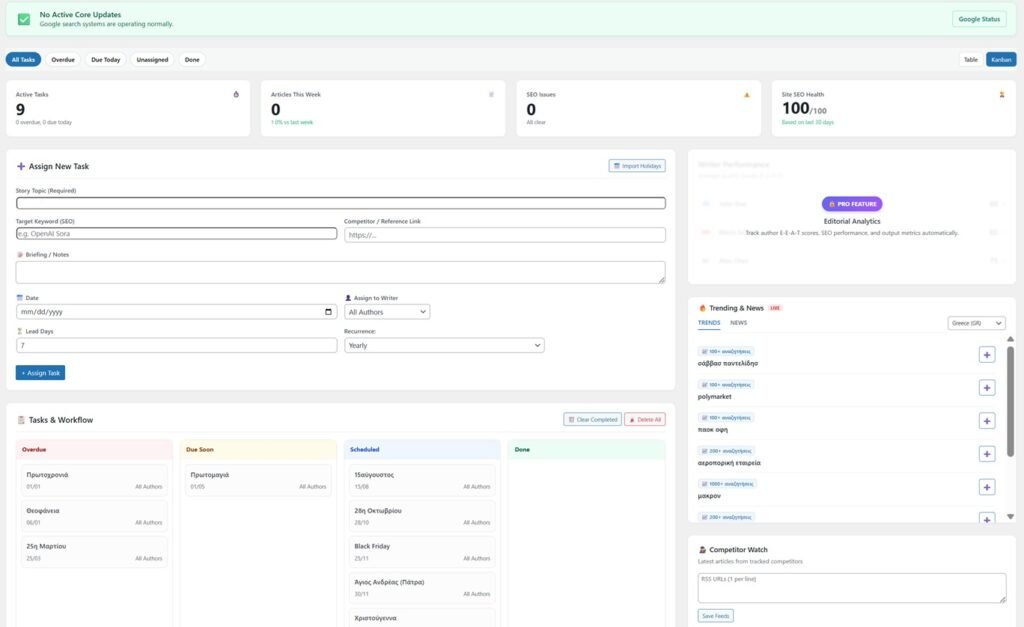
## 6) Main Dashboard (Chief Editor)
From **Editorial Control -> Dashboard** you can:
– Create editorial tasks with date/lead days/assignee
– Track overdue/today/unassigned/done tasks
– Switch table/kanban view
– Monitor missing SEO articles
– Watch competitor feeds and trend signals
### Security Model
– Nonce verification on sensitive actions
– Capability checks for destructive operations
– Safer filter handling (no global unsafe filter wipes)
—
## 7) Editor Sidebar (Authors)
Inside post editor (Classic + Gutenberg):
– Focus Mode (Publish Confidence score + next best action)
– Score details panel
– Suggested tags with confidence badges
– Internal links insertion
– Manual timeline insertion
– Auto-timeline disable checkbox
– Live Coverage Schema checkbox (when globally enabled)
– Featured image eligibility notice (OK / warning / missing)
### Score Behavior
The sidebar evaluates title/content/meta/link signals and updates guidance in near real-time.
—
## 8) Story Timeline Engine
Supports smarter storytelling with configurable strategies:
– Breaking
– Ongoing
– Evergreen
You can configure:
– Days back / strategy window
– Relevance threshold
– Max timeline items
– Label text (Today / Yesterday / Days ago / Start / Full timeline CTA)
—
## 9) Schema Engine Overview
Newsroom OS outputs a JSON-LD graph including key nodes such as:
– `NewsArticle` / `Article` / `LiveBlogPosting`
– `WebSite`
– `WebPage`
– `BreadcrumbList`
– `Organization` / `NewsMediaOrganization`
– `Person` (author entity)
– Optional entity nodes from tags (Person/Place/Organization/etc.)
### 9.1 Strict vs Hybrid Output Policy
– **Strict**: disables Yoast/Rank Math schema output and keeps Newsroom OS graph only.
– **Hybrid**: keeps Newsroom OS graph and allows external plugin schema output.
Choose based on your stack and validation strategy.
### 9.2 Live Coverage Schema
When enabled globally + per-post:
– Article type becomes `LiveBlogPosting` (+ compatibility typing with `NewsArticle`)
– Adds:
– `coverageStartTime`
– `coverageEndTime`
– `liveBlogUpdate` entries (derived from headings, with timestamp-aware parsing where possible)
Fallback to regular article mode remains available.
### 9.3 Featured Image Rules
– Preferred for article eligibility: featured image width >=1200px
– Schema now uses post featured image data for `article.image`
– If no featured image exists, article image is not forced from publisher logo
—
## 10) Schema QA Panel
In settings, the Schema QA panel provides:
– Quick quality hints
– Preview JSON-LD template based on current configuration
Use it for fast pre-flight checks before validating live URLs.
—
## 11) E-E-A-T and Entity Enrichment
### Author-level
Supports enriched author fields such as:
– Job title
– Alumni data
– Social profiles
– `knowsAbout` mappings (with optional Wikidata links)
### Tag-level
For each tag you can define:
– Entity type (manual or auto)
– Wikidata URL
– Latitude/Longitude
This improves knowledge graph quality and contextual relevance.
—
## 12) Performance and Scalability
Designed for larger sites with many posts/tags/authors:
– Top tags are cached and capped for editor performance
– Timeline/schema caches reduce repeated heavy processing
– Editorial task retrieval is capped/optimized for sidebar responsiveness
– JS evaluator uses throttled updates and low-cost hash checks
### Recommended for Enterprise Sites
– Use persistent object cache (Redis/Memcached)
– Use page caching + CDN
– Keep PHP workers appropriately sized
– Validate plugin behavior on staging before production rollout
—
## 13) Compatibility
– WordPress Classic Editor: supported
– Gutenberg: supported
– Yoast SEO: supported
– Rank Math: supported
– Elementor/page builder feeds: supported via feed/page settings
—
## 14) Validation Workflow (Recommended)
For important articles:
1. Ensure featured image is >=1200px.
2. Update the post.
3. Open page source and inspect JSON-LD.
4. Validate with:
– <https://validator.schema.org/>
– <https://search.google.com/test/rich-results>
5. If using Live Coverage, confirm `LiveBlogPosting` + `liveBlogUpdate` presence.
—
## 15) Troubleshooting
### Score not updating
– Hard refresh editor (`Ctrl+F5`)
– Check for JS conflicts from other editor plugins
– Test in both Classic and Gutenberg
– Disable aggressive optimization/minification temporarily to isolate conflicts
### LiveBlog appears in source but not in Google rich test
– Google may not always surface it as a rich feature
– Confirm graph validity in `validator.schema.org`
– Ensure article fundamentals (image, metadata, canonical consistency) are strong
### Featured image warning in sidebar
– Upload a featured image >=1200px width
– Update post and re-check
### Duplicate/competing schema
– Switch output mode to `Strict` if needed
– Re-test after cache purge
—
## 16) Security Notes
Current architecture includes:
– Nonce checks on key write actions
– Capability checks for sensitive operations
– Sanitization/escaping in settings and UI outputs
Best practice:
– Keep WordPress/plugins updated
– Restrict admin access
– Use staging for major updates
—
## 17) Upgrade Notes to v1.5.0
After upgrading:
1. Clear site/page/CDN cache.
2. Open settings and confirm:
– Schema output mode
– LiveBlog global toggle
3. Edit one test post and verify sidebar behavior.
4. Re-validate schema on a live URL.
—
## 18) FAQ
### Does it work for blogs too?
Yes. Use Blog profile + `Article` schema mode (or hybrid setup as needed).
### Do I need to remove Yoast/Rank Math?
No. Use `Hybrid` mode to coexist, or `Strict` to let Newsroom OS own schema output.
### Is it safe for high-traffic sites?
Yes, with cache-first configuration and normal WordPress performance practices.
### Does it support Greek and English?
Yes, with expanded i18n coverage across UI and editor guidance.
—
## 19) Support Checklist (When Reporting an Issue)
Please include:
– WordPress version
– PHP version
– Active theme
– Active SEO plugin(s)
– Classic or Gutenberg
– Screenshot/video
– URL + source JSON-LD snippet (if schema issue)
—
## 20) Legal
Newsroom OS is distributed under GPLv2 or later.