
Welcome to Newsroom AI Assistant! This guide will walk you through transforming your standard WordPress installation into a high-performance, enterprise-level Newsroom Operating System.
Welcome to Newsroom AI Assistant! This guide will walk you through transforming your standard WordPress installation into a high-performance, enterprise-level Newsroom Operating System.
- Ο οδηγός Newsroom AI Assistant μετατρέπει το WordPress σε ένα σύστημα λειτουργίας ενημερωτικού γραφείου.
- Το Newsroom OS προσφέρει ένα σύστημα ενημέρωσης 4 βημάτων για την εγκατάσταση.
- Η πλατφόρμα παρέχει εργαλεία για την αυτοματοποίηση της διαδικασίας δημοσιογραφίας.
Step 1: The Setup Wizard
Upon activation, you will be greeted by the 4-step Onboarding Wizard.
-
Site Profile: Enter your Organization’s name and Niche. Choose your workflow type (
Teamfor full editorial features, orSolo Bloggerif you only need the SEO tools). You can also add competitor RSS feeds here. -
Schema Engine: Select your Schema type (
NewsArticleis highly recommended for Google News publishers). Note: Newsroom OS generates a God-Tier JSON-LD output. If you select this, it automatically disables conflicting Yoast/RankMath schema to prevent duplicates. -
Timeline Injection: Choose how the Story Cluster Timeline is displayed:
-
Auto-Pilot: Automatically injected at the end of articles (or after a specific paragraph). 100% Safe: It uses WordPress filters, meaning it doesn’t modify your database. If you uninstall the plugin, no traces are left.
-
Manual: Only appears where you place the
[nros_timeline]shortcode. -
Tip: Use the
{tag}placeholder in your Timeline Heading (e.g.,"The History of {tag} so far:") to make titles dynamic.
-
Step 2: The Command Center (Chief Editor Dashboard)
Navigate to the AI Assistant menu in your WordPress admin panel.
-
Editorial Tasks: Create assignments for your journalists. Set the Topic, Date, Recurrence (e.g., Yearly holidays), and Lead Days (how many days in advance the journalist should be warned).
-
Missing SEO (Actionable Insight): The system scans your database for posts from the last 30 days. If a journalist forgot to write a Meta Description in Yoast or Rank Math, it flags them here. Click the red “Missing SEO” box to instantly filter your WordPress Posts list and see exactly which articles need fixing!
-
Competitor Watch: Keep an eye on rival publishers. Articles from the RSS feeds you provided will appear here in real-time, color-coded by source. Click the
+button next to any news item to instantly turn it into an Editorial Task. -
Google Search Status: A live API connection to Google warns you (🚨) if there is an active Core Algorithm Update, preventing you from making rushed SEO changes during high volatility.
Step 3: Editor Tools & Sidebar
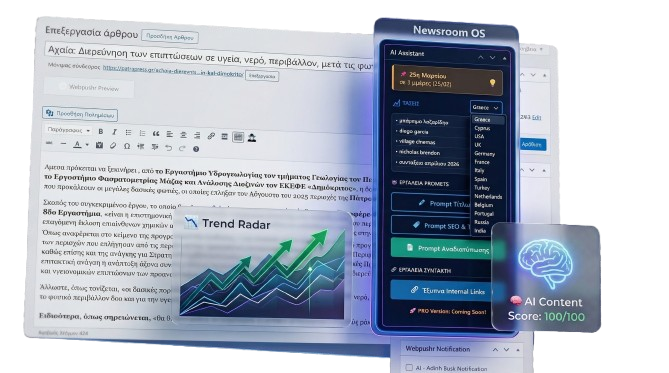
When a journalist opens a post (Gutenberg or Classic Editor), the powerful Newsroom OS sidebar appears on the right.
-
My Upcoming Tasks: If the logged-in journalist has pending assignments within the “Lead Days” timeframe, a yellow warning widget appears at the very top of their sidebar with the Chief’s instructions.
-
Trend Radar: Two tabs (
TRENDSandNEWS) show live, unfiltered data from Google based on your targeted Geo-location. Click the+button to assign a trending topic. -
Smart Internal Linking: Type a keyword, hit search, and select past articles using checkboxes. Click “Insert Links” to instantly drop a beautifully formatted “Read Also” cluster into your content.
-
Google Preview: A dynamic snippet that updates in real-time as you type your headline.
-
AI Prompts: 1-click prompt engineering. Click “SEO Headlines” or “Structure & FAQ”. The plugin copies your article’s content and the perfect system prompt to your clipboard, ready to be pasted into ChatGPT, Gemini, or Claude.
Step 4: E-E-A-T & True Semantic SEO
Google requires strong E-E-A-T (Experience, Expertise, Authoritativeness, Trustworthiness). We built an engine that proves it.
-
Author Profiles: Go to
Users -> Profile. Fill in the journalist’s Job Title, Alumni Of (University | URL), and Social Media links. -
Wikidata Expertise (KnowsAbout): In the author’s profile, list the exact topics they are experts in using Wikidata URLs (e.g.,
Pensions | https://www.wikidata.org/wiki/Q179264). -
Tag Mapping: Go to
Posts -> Tags. You can now assign a specific Wikidata URL to any WordPress Tag. The Newsroom OS Schema Engine will combine the Author’s manual expertise with the tags they frequently write about, generating a semantic web that Google loves.
Step 5: Performance & Zero-Latency ⚡
Newsroom OS is engineered for high-traffic sites.
-
Zero Database Load: All generated Story Timelines and Schema outputs are cached in the server’s RAM using WordPress Transients for 4 to 12 hours.
-
Speculation Rules API: Integrated natively. When a reader hovers their mouse over your Internal Links or Story Timeline, the browser predicts the click and prefetches the page in the background. When they click, the next article loads instantly (in milliseconds), maximizing your Pageviews per Session and AdSense revenue. Completely compatible with modern
bfcachestandards.
Enjoy the fastest, smartest newsroom you’ve ever managed!